




How can we help you?
Welcome to Carrot’s help and support page. Select a category or search your query to get started.
My driving and device
Can the Telematics device be fitted to all cars?
Yes. Installing and activating your self-fitted Telematics device is quick and straightforward. Most users can complete the setup in under an hour by following the provided instructions for self-fitted device.
The device is compact and designed to be discreetly placed out of sight, with no impact whatsoever on your vehicle’s performance or operation.
Do named drivers need to follow the Telematics device rules?
Yes – all drivers using the insured vehicle must follow the black box guidelines. This helps ensure the policy remains valid and is not affected by any unsafe driving behaviour.
How do I know what Telematics device type I have?
We currently use 2 different device types:
- Self install (Theo) — This is a device that you can install yourself using our guides.
- Hardfitted — This is a device that is fitted to your vehicle by a technician.
If you are unsure what device type you have, you can check your policy documents which will give you all the information you need.
How do I reset my self install device?
If your device stops recording your trips, it may need to be reset or recharged — especially if the battery is low.
Here’s what to expect:
- You’ll receive an email from the provider with a link containing step-by-step instructions to help you reset or recharge the device.
- You can also access the instructions directly using the link below.
- If you need further assistance, please contact us here.
How does the self install device (Theo) and app work?
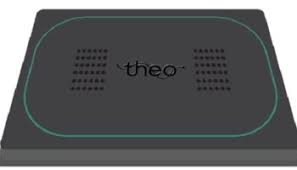
Theo is a solar-powered telematics device that monitors your driving behaviour and sends insights to the Better Driver by Carrot app.
This innovative technology keeps you informed by sending notifications if it detects risky driving behaviour, such as speeding or incidents. It’s easy to use and provides a driving score based on your performance.
How private is the data recorded by my Telematics device?
We’re serious about privacy. The data recorded by your Telematics device remains private.
If I have an accident and the Telematics device is damaged, do I need to pay for a new one?
The cost of a new device would be classed as a repair cost, which would be covered by your Carrot Insurance policy. If you change your vehicle after a total loss claim, you will have to pay for a new device to be fitted depending on the outcome of the claim.
Is there an additional cost for the Telematics device?
No. The device and data costs are included with your Carrot policy at no additional cost.
What data does the Telematics device record?
The Telematics device records your journeys and information about how you’ve been driving. This includes data on speed, smoothness and usage, which all contribute to your total Driving Score. The Telematics device also enables your car’s GPS location to be identified in the unfortunate event that your car gets stolen.
What do I need to do if an engineer needs to install my Telematics device?
If you have a hard fitted device, before the appointment the engineer will get in touch to let you know when to expect them.
When they arrive just hand over your car keys so they can fit the hardfitted telematics device. They’ll also take some photographs of your car and check its roadworthiness. Finally they’ll check that there aren’t any modifications to your car, as we can’t insure any car that has been modified.
It usually takes just under an hour, and can be done at a location of your choice – so no need to take the day off work!
What should I do if my self install device falls off the windscreen?
If the telematics device detaches from your windscreen, it may be due to incorrect installation or weather-related issues.
Our device provider will be notified automatically and will send a replacement cradle to your address. You’ll also receive an email confirmation.
Please follow the installation instructions provided via the link below and upload a photo through the app to confirm successful installation.
Note: There is a limit to how many replacement cradles you can request per policy year, so ensure the device is fitted correctly.
Reminder: Please do not remove the device from the windscreen unless instructed to.
Self install (Theo)
Carrot Insurance services offer a self-installation device called Theo. The Theo device is a solar powered device with a built-in battery that gets its power from the sun. If you are appointed the Theo device through your telematics policy, you will be required to install the device and cradle within 48 hours of receiving. To install the Theo, you will need to attach the device onto your cradle and place the cradle on your windscreen following the instructions provided by ThingCo, the telematics provider.
Installation
- To get started, your Telematics Tracking Device (Theo) will be posted to you through recorded delivery.
- You must install your device in your car and activate it within 48 hours (2 days) from receiving your device. If you are unable to install and activate the tracking device within this time, your policy will be cancelled.
- You will receive set up instructions from Theo on behalf of Carrot, please make sure you follow them carefully as you will need to connect your device to the Better Driver by Acorn App.
- The Telematics Tracking Device (Theo) can be installed into all vehicles.
Things to remember
- Please do not remove the device from your car unless we instruct you to do so.
- If you change your car, you must keep the device, and a replacement cradle will be posted to you. You must reinstall the tracking device in your car and activate it within 48 hours of receiving the replacement cradle.
- It is your responsibility to ensure that any other party who has an interest in the ownership of your car (such as your partner or a hire purchase company) has agreed that the device can be installed.
How We Monitor Your Driving
We will monitor your driving behaviour through your telematics tracking device and look at factors such as:
Time of Day
There are certain circumstances which may lower your driving score as there is a greater risk of potential accidents. For example:
- The period after midnight to the early hours of the morning is the highest risk zone.
- The midweek commuting periods are also high risk based on the potential number of accidents that can happen, if you are also driving this time at high speeds, this will lower your driving score.
Driving Duration
Trips which involve more than 2 hours continuous driving can greatly increase the risk of serious accidents. This can be caused by things like tiredness and lack of concentration. Your driving score will decrease for every trip that you drive for 2 hours or more.
Speeding
Your speeding score is based on the number of times your actual speed exceeds the speed limit specified for road types. Exceeding the limit will lower your score regardless, but exceeding on a country lane will bring your score down more than if you were driving on a motorway, for example.
Eco Driving
Eco Driving can be defined in many different ways. We are measuring this by combining certain driving behaviours (forms of acceleration) into a simple score. You score will be determined by three different behaviours:
- Speeding-up
- Braking, and
- Cornering
Top Up Miles (TUMs)
We will monitor your mileage on an annual basis and if we suspect that you will go over your allowance, we will let you know before this happens to ask you to top up your mileage. You can contact us or use our customer portal. The maximum mileage limit for any one period of Insurance is 30,000 miles.
Cancellation of Your Policy
There are some circumstances that you need to be aware of, which may mean your policy will be cancelled. See the below for some of the key terms however, you will need to read your Policy Booklet for further information.
- Tampering/Alterations: If, during the monitoring of data, we suspect that there has been unauthorised interference with your device or any interference with the GPS/GSM signal emitted, your policy will be cancelled. Please refer to the Tampering/Alterations section of your Policy Booklet for further details.
- Exceeding your allocated annual mileage allowance
- Excessive Speeding
- Poor Driving Score
- If we detect that your car is consistently parked away from the declared overnight parking address
- If you remove the telematics tracking device from your car without a prior instruction from us or the Telematics Provider
- You do not have your mobile device with you, or it is turned off during a journey, or the Better Driver by Acorn App is uninstalled.
All about your Driving Score
The telematics device is recording mileage, speed, smoothness and usage. Here is everything you need to know about the driving score
Mileage – the telematics device records the mileage on an annual basis and if you are due to exceed your annual allowance we will notify you prior to it.
Speed – There are two parts to speed: the safe speed of the road, and speed limits. Sticking to the speed limit is an obvious one – not only will driving over the limit reduce your Driving Score, you’re also at risk of a fine or points on your licence and a potential cancellation on your policy depending on the severity of the speed. Safe speed is about judging the road conditions and being prepared for the unexpected.
Smoothness – Smoothness, unsurprisingly, measures how smoothly you drive. It considers sudden braking, sharp acceleration and how quickly you take corners. Trying to anticipate the road ahead where possible and easing off when going over speed bumps will help improve your smoothness score – your car will thank you for it too!
Usage – Usage includes the time of the day you’re driving and the duration of your journeys. When completing long journeys always make sure you take breaks in between, we don’t want you tired, and we want you safe. Also, avoid completing journeys late at night. Usually during night the drivers driving behaviour changes and it is safer for you to avoid this type of journey. This will affect your usage and overall score.
If you keep a good driving score throughout the year you might be eligible for renewal discounts. If your score is constantly low during the policy period you might receive a cancellation notice.
Privacy is something Carrot takes very seriously and the data that goes to create your Driving Score is yours. Your data can be used positively if another driver is trying to make a false claim about you.
We also promise to:
- Adhere to Data Protection laws – read our Privacy Notice
- NOT release your data to the police or to any civil authorities, unless we suspect fraud or attempted fraud, or if we are instructed to do so by law or court order
- NOT use your data in a ‘big brother’ kind of way to tell anyone about where you are or what you’re doing. If you do have an occasional lapse and exceed the speed limit, you can rest assured that it goes no further than affecting your Driving Score
Useful links

Manage policy
Need to make a change? Update your details and manage your policy online.

Make a claim
Reporting an incident? We’ll help you get your claim started as quickly as possible.

Upload documents
Got documents to send us? You can upload them here quickly and securely.
Quick answers to the usual questions
Can’t find what you’re looking for? Our help centre has 50+ short articles or use our virtual assistant.
What if I change my car?
If you’re thinking about changing your car, please contact us before buying the new vehicle so we can check whether we can continue to cover you. You can make up to 5 vehicle changes during your policy term.
If your vehicle change is accepted, keep your Theo device and we’ll arrange for a replacement cradle to be posted to you.
Once it arrives, reinstall the same Theo device with the new cradle and upload a fitment photo to the Better Driver by Carrot App within 48 hours.
What should I do if my car is going in the garage?
If your car is going into a garage, make sure they know a telematics device is fitted to the vehicle. You’ll still be responsible for any journeys recorded while it’s there.
If the car is booked in for repairs, please let us know beforehand and share the garage’s details with us. That way, we can review your policy if any driving events are recorded during that time.
What should I do if my Theo device doesn’t look securely fitted?
If you notice that the device isn’t securely attached, please get in touch with us and we’ll let you know what to do next. The device needs to stay correctly fitted to work properly, so don’t try to move or refit it without speaking to us first.
How often do I need to charge my telematics device?
In winter, you should charge your device once a week for up to 8 hours, until you see a green light showing it’s fully charged. In summer, the solar panel gets more light, so you’ll usually need to charge it less often – only when you receive low‑battery reminders. Keeping the device charged ensures your journeys are recorded properly.
Why have I been asked to complete a tamper form or send photos?
We’ve received a tamper alert, which means the device has detected movement while it wasn’t being driven and may have been removed or disturbed. Please complete the tamper form and upload a clear photo of the device on your windscreen in the Better Driver by Carrot app so we can check it’s fitted properly.
I’ve been asked to reset my telematics device, how do I do that?
First, charge your device for 8 hours until it’s fully charged. Then press the reset button as shown in the reset instructions we sent you by email.
You will receive an email from ThingCo to book a support call, alongside any reset requests we send you. Keep an eye out for your email to book a slot and a member of the ThingCo team will be in touch to help.
How do I return my device when my policy has finished?
When your policy ends, ThingCo (your device provider) will send you a prepaid returns package. Put the device in the package and post it back. Returning your device helps us reuse and recycle equipment and reduces waste.
What if I want to make a change to my policy?
You can make changes to your policy online using the Customer Portal or by calling our customer service team on 0208 629 3308 (Monday–Saturday, 09:00–17:30).
To log in to the Customer Portal:
- Click the portal registration link in your Welcome Email or Letter, or use the registration email sent to you separately.
- Enter the email address you used to set up your policy.
- Create a password using the link we send you to verify your email.
You can then log into the portal with these details throughout your policy. If you change your email address, you’ll need to repeat this registration process with the new email.
Couldn’t find what you were looking for?
Chat with our virtual assistant or contact our team – we’re happy to help.