




How can we help you?
Welcome to Carrot’s help and support page. Select a category or search your query to get started.
Telematics insurance
Am I entitled to a refund if my policy is cancelled due to exceeding my mileage allowance?
No, if your policy is cancelled because you exceeded your mileage allowance, you will not be entitled to any refund.
Can I reduce the cost of my policy?
Once your Carrot Insurance policy is active, we’re unable to reduce the premium, as it’s based on your personal details and current market rates.
If you find a cheaper quote — either with us or another provider — you’re free to cancel your existing policy and take out a new one at any time.
Can you give an example of the top-up requirement if I’m over my mileage?
Yes. For example, if you have an allowance of 10,000 miles but are predicted to drive 20,000 miles, you’re exceeding your limit by 10,000 miles. You must top up by at least 5,000 miles (50% of the excess).
Do I need to pay for top-up miles immediately upon being contacted, or do I have some time?
You are required to purchase the necessary top-up miles promptly after being contacted. Delaying your purchase may result in policy cancellation if you do not comply within the timeframe provided.
How do I get my proof of ‘no claims’ if I don’t renew?
We will email this to you. If you don’t receive it in a few days, contact us.
How do I purchase Top Up Miles (TUMS)?
To top up your miles contact us or sign in to the Carrot Customer Portal.
Our opening hours are Monday–Saturday 09:00–17:30.
How does the self install device (Theo) and app work?
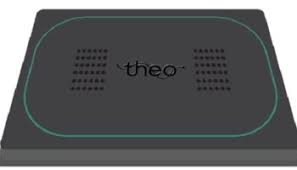
Theo is a solar-powered telematics device that monitors your driving behaviour and sends insights to the Better Driver by Carrot app.
This innovative technology keeps you informed by sending notifications if it detects risky driving behaviour, such as speeding or incidents. It’s easy to use and provides a driving score based on your performance.
How is a refund calculated if I cancel my telematics policy within the first 50 days?
If your policy cancels due to you having exceeded your mileage allowance, or if you have made a claim, or a claim has been made against you, you will not be entitled to a refund.
If your policy is cancelled for any other reason and is cancelled within the first 50 days, your refund will be calculated based on the remaining days on your policy. You will also be charged a total of £109.00 – a £75 Cancellation Fee and £34 device fee (for further information on fees please check your terms of business agreement). If you pay by monthly instalments, your refund will be used to reduce the amount owed on your finance agreement.
How is my predicted mileage monitored during my policy?
We monitor your mileage on an annual basis. If you are at risk of exceeding your annual mileage allowance or are predicted to double your allowance within the first 50 days, we will contact you.
How is my renewal quote calculated?
Your price will be based on several factors, including:
- Insurer prices for the year
- Number of miles we think you’ll need, based on past driving
- If you’ve had any claims in this policy year
- Your total no claims entitlement
- Your personal details
I want to renew but my details have changed
Don’t worry! Contact us to update your information. Our team will let you know if we can offer a price based on your new info.
It’s important that you update your details before your policy renews, so that we can ensure your policy is valid.
If I cancel my policy, will I lose my no claims discount?
You won’t lose the discount completely, unless you’ve made a claim – but it will stay the same as when you joined Carrot.
No claims discount (NCD) is awarded for each full year of insurance, so if you cancel mid-way through the year your no claims discount will not increase.
For example, if you joined Carrot with no previous no claims discount and cancelled 6 months into your policy having had no accidents, you will start at zero no claims discount for your next policy.
Is there a fee for topping up my miles?
Yes. The premium increase of your miles will be calculated at point of purchase & is based on your driving score, you can use your Carrot Better Drive App to monitor your driving score. Alongside this, there is also a £30 non-refundable administration fee.
Is there an additional cost for the Telematics device?
No. The device and data costs are included with your Carrot policy at no additional cost.
Mileage
Mileage terms if your policy started on, or after 10/09/2025
We will monitor your mileage on an annual basis and if we suspect that you will either exceed your mileage allowance or you are predicted to exceed your allowance by double within the first 50 days of your policy, we will contact you to make you aware. If you are not topping up your mileage you could be at risk of cancellation.
IMPORTANT: If you are predicted to exceed your allowance by double within the first 50 days, you will then need to top up your mileage by at least 50% of the number of miles that you expected to exceed your annual mileage allowance by otherwise your policy will be cancelled.
EXAMPLE: If you have selected 10000 miles and are predicted to drive 15000 miles, this will mean you will exceed your annual mileage by 5000 miles, so you will need to top up by at least 2500 miles.
To top up either contact us or use the Carrot Customer Portal. Each time you do top up your miles you will be charged a £30 non-refundable administration fee on top of any additional premium that will need to be paid.
The maximum mileage limit for any one period of Insurance is 30000 miles.
What data does the Telematics device record?
The Telematics device records your journeys and information about how you’ve been driving. This includes data on speed, smoothness and usage, which all contribute to your total Driving Score. The Telematics device also enables your car’s GPS location to be identified in the unfortunate event that your car gets stolen.
What happens if I do not purchase the required top-up miles after being notified?
Unless there are any exceptional circumstances, if you do not buy the minimum required top-up miles after being notified, your policy will be cancelled. This ensures that all policyholders stay within their agreed mileage limits and maintain valid cover.
What happens if I’m predicted to exceed my annual mileage within the first 50 days?
If we predict that you’ll drive double your annual allowance within the first 50 days of your policy, you must purchase Top Up Miles (TUMS). You’re required to top up at least 50% of the excess mileage predicted, or your policy may be cancelled.
What happens to my refund if I cancel after 50 days?
If your policy cancels due to you having exceeded your mileage allowance, or if you have made a claim, or a claim has been made against you, you will not be entitled to a refund.
If your policy is cancelled for any other reason, and is cancelled after the 50 days, your refund will be based on whichever is the lesser amount from calculating the refund on both: the remaining days or remaining miles on your policy. You will also be charged a total of £109.00 – a £75 Cancellation Fee and £34 device fee. If you pay by monthly instalments, your refund will be used to reduce the amount owed on your finance agreement.
What happens to the telematics device if I cancel?
If you have a self install (Theo) device, please remember this is required to be returned for recycling. Please be aware that your Theo device contains a battery so can’t be disposed of with your household waste.
For hard fitted devices, we don’t continue recording your driving data after cancellation. But if you want to remove the device, please take it to a suitable recycling centre.
If you have a hard fitted device and would like an engineer to remove this for you, please contact us and we can arrange an appointment for you. Removal will be charged at £50. You don’t need to return the device after cancellation.
What if I want to cancel my policy?
If you want to cancel your policy, please use the cancellation form to request a cancellation. To find out about the fees associated with this, please contact us — you can also read our terms & conditions here.
What is telematics?
‘Telematics’ is just another word for the technology we use to record your journeys and driving style.
Using some smart motion sensors and other clever gizmos, Carrot’s telematics device collects and sends journey information to us.
It measures things like acceleration, braking, swerving, and the number and length of journeys that you make. We use this information to calculate your Driving Score.
What should I do if I have questions or need help with my mileage or top-up process?
If you have any queries or need assistance, please contact us.
Our opening hours are Monday–Saturday 09:00–17:30.
Or use the Carrot Customer Portal for guidance and support regarding your mileage or top-up process.
What should I do if I receive a warning about my mileage?
You must top up your miles if instructed to do so, contact us or via the Carrot Customer Portal, to avoid cancellation of your policy.
Our opening hours are Monday–Saturday 09:00–17:30.
If your policy is due to be cancelled you will receive notification of this by email.
What should I do if my car is going in the garage?
If your car is scheduled for repairs, please let us know before it goes into the garage. Share the garage details with us so we can review your policy if any events occur during that time.
Also, make sure your engineer is aware that a telematics device is installed in the vehicle.
What’s the maximum mileage I can have on my policy?
The maximum mileage limit for any one period of insurance is 30,000 miles.
When can I expect to receive my renewal invitation?
We’ll send your renewal invitation a few weeks before your policy is due to end. This gives you plenty of time to check everything is correct. Get in touch if you need to make any changes.
Why do I need to state how many miles I expect to travel in a year?
The more miles you travel, the greater your chance of being involved in an accident. The cost of your policy may be higher if you travel more miles in a year.
Don’t know your mileage? Don’t worry! We know it can be hard to predict your mileage, especially if it’s your first car insurance policy. We provide a handy calculator when you get a quote on our website, or you can contact us.
What if I don’t buy enough miles at the start of my policy?
If it looks like you’re going to exceed your mileage allowance, you can top-up at any point. If you buy miles in the first 30 days of your policy, we will apply a discount.
Will I get my initial payment back if I cancel my policy?
If you choose to cancel your policy, cancellation fees may apply depending on when the cancellation occurs.
Cooling-off period (first 14 days): No cancellation fees will be charged.
After the cooling-off period (after 14 days): Cancellation fees may be applied.
At the time of cancellation, we will charge for the time you were covered, and additional fees may be included.
Please note that your initial payment is part of the annual premium and covers the first month of your insurance policy.
This payment is usually higher than your regular monthly instalments, as it helps reduce the cost of your ongoing monthly payments.
Will I receive updated reminders if I approach my mileage limit later in the policy year?
Yes, we will continue to monitor your mileage throughout the policy term. If you are predicted to exceed your allowance at any point, we’ll notify you so you can top up your miles as needed.
You can monitor your mileage throughout the policy year using the Carrot Better Driver App. You can also contact us. Our opening hours are Monday–Saturday 09:00–17:30.
Telematics explained
Why Your Telematics device is Your Best Driving Buddy
Getting your driving licence is a huge achievement — and with it comes the freedom and independence of the open road! As a Carrot Insurance Services Telematics customer, you might be wondering what it’s all about. Good news: this little device can be a big win for your safety and your driving confidence.
What’s a Telematics device Anyway?
A Telematics device (also known as a black box, hardfitted device or a self install device) is a small gadget installed in your car that tracks how you drive — like journey speeds and distance. As such, it can help you become a safer, more confident driver.
Top Benefits of Having a Telematics device
Here’s why embracing your Telematics device can be a smart move:
- No Claims Bonus – Each year you drive claim-free, you build up a bonus that can reduce your insurance costs even more.
- Peace of Mind: Monitoring encourages safer driving and can help locate your car if stolen.
- No charging required – Our self install (Theo) device is solar-powered (and we’ll send you a power bank if needed). Got an IMS device? It’s hardwired — no charging required!
How to Get the Most Out of Your Telematics device
To unlock all the benefits, keep these tips in mind:
- Drive Smoothly – Avoid harsh braking and rapid acceleration.
- Stick to Speed Limits – Safe speeds = better scores.
- Stay Within Your Mileage – Your mileage limit is set up front, so monitor it closely.
- Keep the Device Connected – Make sure your Telematics device is always active and transmitting.
- Drive at the Right Time – Driving late at night can negatively affect your driving score.
- Report Issues Promptly – If something’s not right, let us know straight away.
A Quick Word on Tampering: Just Don’t
We get it — some drivers might be tempted to interfere with their Telematics device if you’re driving late at night or with friends. But here’s why that’s a bad idea:
- It’s Illegal – Using jammers or tampering with the device can lead to fines, penalty points, or worse
- Policy Cancellation – If we detect tampering, your policy will be cancelled immediately — leaving you uninsured.
- Safety First – The Telematics device helps protect you and others on the road. Tampering puts that at risk.
Final Thoughts: Your Telematics device is on Your Side
Think of your Telematics device as your digital driving buddy, it’s not about restrictions, it’s always there to support you, cheer you on, and help you drive smarter.
It’s essential your Telematics device stays connected and active. If it stops transmitting data for any reason, your policy will be automatically cancelled — and we’ll let you know right away by phone and email. So, keep your device running smoothly and enjoy the journey with confidence!
If you have any further questions or if your Telematics device stops working, please don’t hesitate to contact us.
Self install (Theo)
Carrot Insurance services offer a self-installation device called Theo. The Theo device is a solar powered device with a built-in battery that gets its power from the sun. If you are appointed the Theo device through your telematics policy, you will be required to install the device and cradle within 48 hours of receiving. To install the Theo, you will need to attach the device onto your cradle and place the cradle on your windscreen following the instructions provided by ThingCo, the telematics provider.
Installation
- To get started, your Telematics Tracking Device (Theo) will be posted to you through recorded delivery.
- You must install your device in your car and activate it within 48 hours (2 days) from receiving your device. If you are unable to install and activate the tracking device within this time, your policy will be cancelled.
- You will receive set up instructions from Theo on behalf of Carrot, please make sure you follow them carefully as you will need to connect your device to the Better Driver by Acorn App.
- The Telematics Tracking Device (Theo) can be installed into all vehicles.
Things to remember
- Please do not remove the device from your car unless we instruct you to do so.
- If you change your car, you must keep the device, and a replacement cradle will be posted to you. You must reinstall the tracking device in your car and activate it within 48 hours of receiving the replacement cradle.
- It is your responsibility to ensure that any other party who has an interest in the ownership of your car (such as your partner or a hire purchase company) has agreed that the device can be installed.
How We Monitor Your Driving
We will monitor your driving behaviour through your telematics tracking device and look at factors such as:
Time of Day
There are certain circumstances which may lower your driving score as there is a greater risk of potential accidents. For example:
- The period after midnight to the early hours of the morning is the highest risk zone.
- The midweek commuting periods are also high risk based on the potential number of accidents that can happen, if you are also driving this time at high speeds, this will lower your driving score.
Driving Duration
Trips which involve more than 2 hours continuous driving can greatly increase the risk of serious accidents. This can be caused by things like tiredness and lack of concentration. Your driving score will decrease for every trip that you drive for 2 hours or more.
Speeding
Your speeding score is based on the number of times your actual speed exceeds the speed limit specified for road types. Exceeding the limit will lower your score regardless, but exceeding on a country lane will bring your score down more than if you were driving on a motorway, for example.
Eco Driving
Eco Driving can be defined in many different ways. We are measuring this by combining certain driving behaviours (forms of acceleration) into a simple score. You score will be determined by three different behaviours:
- Speeding-up
- Braking, and
- Cornering
Top Up Miles (TUMs)
We will monitor your mileage on an annual basis and if we suspect that you will go over your allowance, we will let you know before this happens to ask you to top up your mileage. You can contact us or use our customer portal. The maximum mileage limit for any one period of Insurance is 30,000 miles.
Cancellation of Your Policy
There are some circumstances that you need to be aware of, which may mean your policy will be cancelled. See the below for some of the key terms however, you will need to read your Policy Booklet for further information.
- Tampering/Alterations: If, during the monitoring of data, we suspect that there has been unauthorised interference with your device or any interference with the GPS/GSM signal emitted, your policy will be cancelled. Please refer to the Tampering/Alterations section of your Policy Booklet for further details.
- Exceeding your allocated annual mileage allowance
- Excessive Speeding
- Poor Driving Score
- If we detect that your car is consistently parked away from the declared overnight parking address
- If you remove the telematics tracking device from your car without a prior instruction from us or the Telematics Provider
- You do not have your mobile device with you, or it is turned off during a journey, or the Better Driver by Acorn App is uninstalled.
How do I get my proof of ‘no claims’ if I don’t renew?
We will email this to you. If you don’t receive it in a few days, contact us.
Useful links

Manage policy
Need to make a change? Update your details and manage your policy online.

Make a claim
Reporting an incident? We’ll help you get your claim started as quickly as possible.

Upload documents
Got documents to send us? You can upload them here quickly and securely.
Quick answers to the usual questions
Can’t find what you’re looking for? Our help centre has 50+ short articles or use our virtual assistant.
What if I change my car?
If you’re thinking about changing your car, please contact us before buying the new vehicle so we can check whether we can continue to cover you. You can make up to 5 vehicle changes during your policy term.
If your vehicle change is accepted, keep your Theo device and we’ll arrange for a replacement cradle to be posted to you.
Once it arrives, reinstall the same Theo device with the new cradle and upload a fitment photo to the Better Driver by Carrot App within 48 hours.
What should I do if my car is going in the garage?
If your car is going into a garage, make sure they know a telematics device is fitted to the vehicle. You’ll still be responsible for any journeys recorded while it’s there.
If the car is booked in for repairs, please let us know beforehand and share the garage’s details with us. That way, we can review your policy if any driving events are recorded during that time.
What should I do if my Theo device doesn’t look securely fitted?
If you notice that the device isn’t securely attached, please get in touch with us and we’ll let you know what to do next. The device needs to stay correctly fitted to work properly, so don’t try to move or refit it without speaking to us first.
How often do I need to charge my telematics device?
In winter, you should charge your device once a week for up to 8 hours, until you see a green light showing it’s fully charged. In summer, the solar panel gets more light, so you’ll usually need to charge it less often – only when you receive low‑battery reminders. Keeping the device charged ensures your journeys are recorded properly.
Why have I been asked to complete a tamper form or send photos?
We’ve received a tamper alert, which means the device has detected movement while it wasn’t being driven and may have been removed or disturbed. Please complete the tamper form and upload a clear photo of the device on your windscreen in the Better Driver by Carrot app so we can check it’s fitted properly.
I’ve been asked to reset my telematics device, how do I do that?
First, charge your device for 8 hours until it’s fully charged. Then press the reset button as shown in the reset instructions we sent you by email.
You will receive an email from ThingCo to book a support call, alongside any reset requests we send you. Keep an eye out for your email to book a slot and a member of the ThingCo team will be in touch to help.
How do I return my device when my policy has finished?
When your policy ends, ThingCo (your device provider) will send you a prepaid returns package. Put the device in the package and post it back. Returning your device helps us reuse and recycle equipment and reduces waste.
What if I want to make a change to my policy?
You can make changes to your policy online using the Customer Portal or by calling our customer service team on 0208 629 3308 (Monday–Saturday, 09:00–17:30).
To log in to the Customer Portal:
- Click the portal registration link in your Welcome Email or Letter, or use the registration email sent to you separately.
- Enter the email address you used to set up your policy.
- Create a password using the link we send you to verify your email.
You can then log into the portal with these details throughout your policy. If you change your email address, you’ll need to repeat this registration process with the new email.
Couldn’t find what you were looking for?
Chat with our virtual assistant or contact our team – we’re happy to help.