



Getting your black box set up is simple. Your device will be posted to you by recorded delivery within 24 hours of purchase, so you can expect to receive it very quickly. Follow the steps below to get everything installed and ready for your first journey.
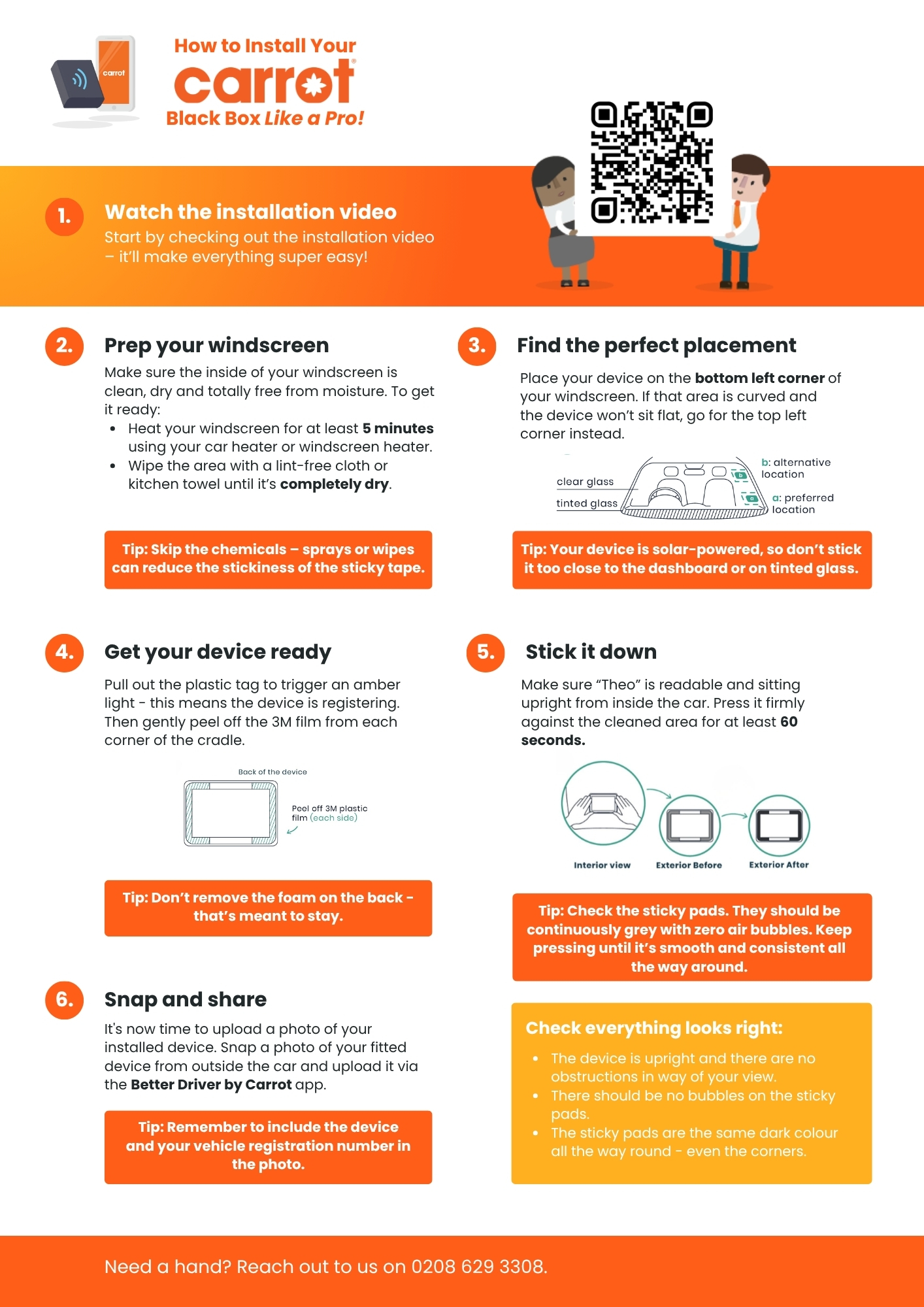
Follow these steps to get your black box set up:
- Park safely
Make sure your car is parked safely before you start. - Make sure your windscreen is clean and dry
In colder months, turn your heaters on and warm the inside of the windscreen before you stick the cradle on.
In summer, you do not need to heat the windscreen – it will already be warm enough. - Fit the black box
Peel off the backing and stick the cradle to the inside of your windscreen, in the position shown in your fitting email. Push the device on so it is secure. - Pull out the white tab
This switches the black box on and gets it ready to start sending us your data. - Take a fitment photo
Stand in front of your car and take a clear photo showing your number plate and black box on the windscreen. - Upload your photo
Upload the picture to the Better Driver by Carrot app.
You must do this within 48 hours of your policy starting or 48 hours from the device being delivered, whichever is later.
You can watch the installation video here – it’ll make everything super easy!